Computer Vision: A Complete Guide to Computer Vision, Its Technology, Applications, Benefits, Challenges, and Future 2026
Introduction
Computer vision is one of the most important and rapidly developing areas of artificial intelligence. It focuses on enabling computers to understand and interpret visual information from the world around them. Humans naturally use their eyes and brains to recognize objects, understand scenes, identify people, read text, and interpret movement. Computer vision attempts to provide machines with similar capabilities through cameras, sensors, algorithms, machine learning, and artificial intelligence.
Modern computer vision is used in many areas of everyday life. Smartphones use computer vision for photography and image enhancement. Online services use it to analyze images and videos. Factories use cameras to inspect products. Healthcare researchers use image analysis to examine medical scans. Vehicles can use visual sensors to understand roads and surrounding objects. Retailers can use visual systems to analyze products and customer behavior.
The field has developed significantly because of improvements in computing power, large datasets, graphics processing units, neural networks, and deep learning. Technologies such as convolutional neural networks and vision transformers have dramatically improved the ability of computers to process images and video.
However, computer vision remains challenging. Real-world visual environments are complex. Lighting can change, objects can be partially hidden, camera angles can vary, and images can contain enormous amounts of information. Systems must also address issues involving privacy, security, bias, accuracy, and responsible deployment.
This article provides a comprehensive overview of computer vision, including its history, basic concepts, image processing, machine learning, deep learning, object detection, image segmentation, facial analysis, optical character recognition, video understanding, applications, challenges, ethical considerations, career opportunities, and future developments.
What Is Computer Vision?
Computer vision is a field of computer science and artificial intelligence concerned with enabling machines to extract meaningful information from images and videos.
A computer vision system may answer questions such as:
- What objects are present?
- Where are the objects?
- What is happening in the scene?
- Is a product defective?
- What text appears in an image?
- How are objects moving?
- Which parts of an image belong to a particular category?
The input may come from:
- Cameras
- Smartphones
- Satellites
- Medical scanners
- Drones
- Industrial cameras
- Security systems
- Autonomous machines
The system processes visual data and produces information or decisions.
How Human Vision Differs From Computer Vision
Humans can recognize visual objects quickly and naturally.
When a person sees a photograph of a car, the brain can identify the car, estimate its position, recognize the surrounding environment, and understand the situation.
A computer does not naturally see the world in this way.
A digital image is represented as numerical data.
For example, a color image can contain millions of pixels. Each pixel contains numerical values representing colors.
Computer vision algorithms transform these numerical values into increasingly meaningful representations.
History of Computer Vision
The roots of computer vision can be traced to early research in image processing and pattern recognition.
Researchers began exploring methods for analyzing images using computers during the twentieth century.
Early systems were often based on manually designed rules and mathematical techniques.
Researchers developed methods for detecting:
- Edges
- Shapes
- Corners
- Textures
- Patterns
These approaches were useful but often struggled with complex real-world environments.
The development of machine learning changed the field.
Instead of manually defining every visual rule, researchers could train models using examples.
The development of deep learning created another major transformation.
Large neural networks trained on huge image datasets began achieving impressive performance on image classification and other tasks.
Digital Images
To understand computer vision, it is useful to understand how images are represented digitally.
A digital image consists of pixels.
A pixel is a small element representing a particular location in an image.
A grayscale image can represent each pixel using an intensity value.
A color image often uses multiple channels.
The most common model is RGB:
- Red
- Green
- Blue
Each pixel can therefore be represented using three numerical values.
Image Resolution
Resolution describes the number of pixels contained in an image.
For example, an image might have a resolution of:
1920 × 1080 pixels
Higher resolution can provide more visual detail, but it also requires more storage and computational resources.
Image Channels
A grayscale image generally contains one channel.
An RGB image contains three channels.
Some images can contain additional channels.
For example, scientific and remote-sensing applications may use information beyond visible red, green, and blue wavelengths.
Image Processing
Image processing involves manipulating images to improve quality or extract useful information.
Common operations include:
- Resizing
- Cropping
- Rotation
- Noise reduction
- Sharpening
- Contrast adjustment
- Color transformation
Image processing can be used before computer vision models analyze an image.
Image Filtering
Filters can modify images to emphasize or suppress particular patterns.
Examples include:
- Blur filters
- Sharpening filters
- Edge filters
- Noise-reduction filters
Filtering can be useful for preprocessing.
Edge Detection
Edges are locations where image intensity changes significantly.
Edge detection algorithms can help identify boundaries of objects.
Traditional techniques include methods such as:
- Sobel operators
- Canny edge detection
- Laplacian operators
Although deep learning has reduced the need for many manually designed features, edge concepts remain important for understanding visual structure.
Feature Extraction
A feature is a useful characteristic of visual data.
Traditional computer vision systems often used manually designed features.
Examples include:
- Corners
- Edges
- Texture
- Shape
- Color patterns
Modern deep learning models can learn features automatically from training data.
Machine Learning in Computer Vision
Machine learning allows computer vision systems to learn patterns from examples.
For instance, a model can be trained using thousands or millions of images labeled with categories.
The model learns visual patterns associated with those categories.
When presented with a new image, it can produce a prediction.
Supervised Learning
In supervised computer vision, training images are associated with labels.
For example:
- Image A → Cat
- Image B → Dog
- Image C → Car
The model learns a relationship between images and labels.
Unsupervised Learning
Unsupervised methods attempt to discover patterns without requiring complete human-provided labels.
Applications can include:
- Image clustering
- Representation learning
- Anomaly detection
Self-Supervised Learning
Self-supervised learning creates learning signals from the data itself.
This approach can reduce dependence on manually labeled datasets.
It has become increasingly important for large-scale visual representation learning.
Deep Learning
Deep learning uses neural networks with multiple layers.
These networks can learn increasingly complex representations.
Early layers may learn simple visual patterns.
Later layers can combine those patterns into more complex structures.
For example:
Pixels → Edges → Shapes → Parts → Objects
The actual learned representations can be much more complex than this simplified example.
Convolutional Neural Networks
Convolutional neural networks, commonly called CNNs, became one of the most influential architectures in computer vision.
CNNs use convolutional operations to process spatial patterns.
They are particularly effective for image-related tasks because they can recognize local patterns and combine them into larger structures.
How CNNs Work
A CNN typically consists of layers that transform an input image.
A simplified architecture might include:
- Input image
- Convolution layers
- Activation functions
- Pooling or other spatial operations
- Deeper feature layers
- Classification or prediction layers
Different architectures use different combinations of these components.
Convolution
Convolution applies learned filters to an image.
A filter examines local regions and produces feature maps.
During training, the network learns useful filters from data.
These filters may respond to patterns such as edges, textures, or more complex structures.
Pooling
Pooling reduces the spatial dimensions of feature representations.
Common pooling methods include:
- Max pooling
- Average pooling
Modern architectures may use alternative methods rather than traditional pooling.
Activation Functions
Neural networks use activation functions to introduce nonlinear behavior.
Common activation functions include:
- ReLU
- Sigmoid
- Tanh
- Softmax
Different functions serve different purposes.
Image Classification
Image classification is one of the fundamental computer vision tasks.
The goal is to assign an image to one or more categories.
For example, a system could classify an image as:
- Car
- Bicycle
- Bus
- Truck
Classification does not necessarily tell the system where the object is located.
Multi-Class Classification
Multi-class classification involves choosing among multiple categories.
For example, a model might classify an image as one of several animal species.
Multi-Label Classification
An image can contain multiple labels.
For example, a photograph might contain:
- Person
- Car
- Tree
- Building
A multi-label system can assign multiple categories to the same image.
Object Detection
Object detection goes beyond classification.
It identifies objects and their locations.
A typical object detection system produces:
- Object class
- Bounding box
- Confidence score
For example:
Car — 95% confidence — bounding box
This allows a system to identify multiple objects within the same image.
Bounding Boxes
A bounding box is a rectangular region surrounding an object.
The coordinates describe where the object appears in the image.
Bounding boxes are widely used in:
- Traffic analysis
- Retail systems
- Robotics
- Industrial inspection
- Autonomous driving
Popular Object Detection Approaches
Modern object detection has been developed through many architectures.
Examples include:
- R-CNN
- Fast R-CNN
- Faster R-CNN
- SSD
- YOLO-style detectors
Different architectures make different trade-offs between speed and accuracy.
Real-Time Object Detection
Real-time detection is important when systems must respond quickly.
Applications include:
- Robotics
- Traffic monitoring
- Interactive systems
- Industrial automation
Real-time systems must balance computational requirements and prediction accuracy.
Image Segmentation
Image segmentation assigns labels to pixels or regions.
Instead of simply drawing a rectangle around an object, segmentation can identify the exact pixels belonging to that object.
Semantic Segmentation
Semantic segmentation assigns a category to each pixel.
For example:
- Road
- Car
- Sky
- Building
- Person
All objects of the same category may receive the same label.
Instance Segmentation
Instance segmentation distinguishes between individual objects.
For example, if an image contains three cars, an instance-segmentation model can identify each car separately.
Panoptic Segmentation
Panoptic segmentation combines ideas from semantic and instance segmentation.
It aims to provide a comprehensive pixel-level understanding of a scene.
Image Recognition
Image recognition is a broad term that can refer to systems that identify objects, categories, patterns, or other information in images.
It may involve classification, detection, segmentation, or combinations of these tasks.
Facial Recognition
Facial recognition systems analyze facial features to determine whether faces match known identities or belong to particular categories.
This technology has applications in authentication and security.
However, facial recognition raises significant concerns involving privacy, consent, accuracy, surveillance, and potential bias.
Its use should therefore be carefully governed.
Face Detection
Face detection is different from face recognition.
Face detection asks:
“Where are the faces?”
Face recognition asks:
“Who does this face belong to?”
A system can detect faces without identifying the people in them.
Optical Character Recognition
Optical character recognition, or OCR, converts text appearing in images into machine-readable text.
Applications include:
- Document digitization
- Invoice processing
- Number-plate reading
- Historical archives
- Form processing
Modern OCR systems often combine image processing with machine learning.
Handwriting Recognition
Computer vision can also analyze handwritten text.
Handwriting recognition can support:
- Digitizing historical documents
- Processing forms
- Educational tools
- Note conversion
Handwriting can be difficult because writing styles vary significantly.
Video Understanding
Computer vision is not limited to static images.
Video contains sequences of frames.
Video understanding attempts to identify:
- Objects
- Actions
- Events
- Movement
- Interactions
This requires understanding both spatial and temporal information.
Object Tracking
Object tracking follows an object across video frames.
For example, a traffic system could track a particular vehicle as it moves through a camera’s field of view.
Tracking can be used for:
- Sports analysis
- Traffic monitoring
- Robotics
- Video analytics
Action Recognition
Action recognition attempts to identify activities in video.
Examples include:
- Running
- Walking
- Throwing
- Jumping
- Opening a door
More advanced systems attempt to understand sequences of events.
Pose Estimation
Pose estimation identifies the positions of body joints.
A system may estimate locations such as:
- Shoulders
- Elbows
- Wrists
- Hips
- Knees
- Ankles
Pose estimation can support sports analysis, animation, robotics, and interactive applications.
3D Computer Vision
Traditional computer vision often works with 2D images.
3D computer vision attempts to understand depth and three-dimensional structure.
Sources of 3D information include:
- Stereo cameras
- Depth cameras
- LiDAR
- Structured light
- Multiple viewpoints
Depth Estimation
Depth estimation predicts how far objects are from the camera.
Depth information can help machines understand spatial relationships.
It is important for robotics and autonomous systems.
Stereo Vision
Stereo vision uses two or more cameras positioned at different locations.
By comparing the images, a system can estimate depth.
The concept is similar to how human binocular vision provides depth perception.
LiDAR and Computer Vision
LiDAR uses laser pulses to measure distances.
It can produce three-dimensional point clouds.
Computer vision systems can combine camera images with LiDAR data to improve environmental understanding.
Computer Vision in Autonomous Vehicles
Autonomous vehicles use multiple sensors to understand their environment.
These may include:
- Cameras
- Radar
- LiDAR
- Ultrasonic sensors
Computer vision can help detect:
- Vehicles
- Pedestrians
- Road markings
- Traffic signs
- Traffic lights
- Obstacles
Vision is only one component of a complete autonomous driving system.
Computer Vision in Robotics
Robots need to understand their environments.
Computer vision can help robots:
- Identify objects
- Locate objects
- Navigate
- Recognize obstacles
- Track movement
- Manipulate objects
Industrial robots often use vision systems for inspection and positioning.
Computer Vision in Manufacturing
Manufacturing is one of the important applications of computer vision.
Cameras can inspect products on production lines.
Vision systems can identify:
- Scratches
- Incorrect assembly
- Missing components
- Shape defects
- Color differences
Automated inspection can operate continuously and consistently.
Quality Control
Quality-control systems can compare products against expected standards.
For example, a vision system can inspect every item moving through a production line.
This can help identify defective products before they reach customers.
Computer Vision in Healthcare
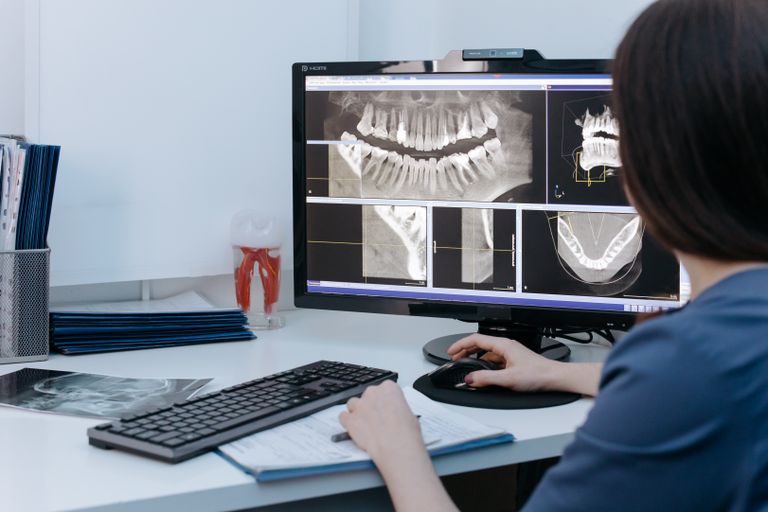
Medical imaging produces large quantities of visual data.
Examples include:
- X-rays
- CT scans
- MRI scans
- Ultrasound
- Microscopy images
Computer vision can assist researchers and healthcare professionals by identifying patterns in images.
It should generally be treated as a decision-support technology rather than an automatic replacement for qualified professionals.
Medical Image Analysis
Computer vision can help analyze medical images for research and clinical workflows.
Potential tasks include:
- Segmentation
- Classification
- Detection
- Image enhancement
- Quantitative measurements
Healthcare applications require rigorous validation because errors can have serious consequences.
Computer Vision in Agriculture
Agriculture increasingly uses cameras, drones, satellites, and sensors.
Computer vision can help identify:
- Crop conditions
- Plant diseases
- Weeds
- Fruit
- Soil characteristics
This can support precision agriculture.
Crop Monitoring
Images can be analyzed to monitor plant growth.
Repeated images over time can reveal changes in vegetation.
Farmers can potentially use this information to improve resource management.
Computer Vision in Retail
Retailers can use computer vision for:
- Inventory monitoring
- Product recognition
- Shelf analysis
- Checkout systems
- Store analytics
Vision can help determine whether products are available on shelves.
Product Recognition
A camera can identify products based on visual characteristics.
This can support automated inventory systems.
Computer Vision in Security
Computer vision can analyze video streams for specific events or objects.
Potential uses include:
- Perimeter monitoring
- Object detection
- Crowd analysis
- Access systems
Security applications must consider privacy and appropriate use.
Computer Vision in Transportation
Transportation systems use cameras for:
- Traffic monitoring
- Vehicle counting
- License-plate recognition
- Road condition analysis
- Incident detection
Computer vision can provide information for transportation planning and management.
Traffic Analysis
Vision systems can estimate:
- Vehicle counts
- Traffic density
- Lane usage
- Vehicle movement
This information can support intelligent transportation systems.
Computer Vision in Sports
Sports organizations use computer vision to analyze players and games.
Applications include:
- Player tracking
- Ball tracking
- Pose estimation
- Tactical analysis
- Performance measurement
Video analysis can provide detailed information that would be difficult to collect manually.
Computer Vision in Entertainment
Computer vision is used in:
- Visual effects
- Animation
- Motion capture
- Augmented reality
- Virtual reality
Motion capture systems can estimate body movement and use it to control digital characters.
Augmented Reality
Augmented reality, or AR, combines digital information with the physical environment.
Computer vision can help AR systems understand:
- Surfaces
- Objects
- Camera movement
- Spatial relationships
This allows digital objects to appear anchored to real-world environments.
Virtual Reality
Virtual reality creates immersive digital environments.
Computer vision can be used for:
- Hand tracking
- Body tracking
- Environment understanding
- User interaction
Computer Vision in Smartphones
Modern smartphones use computer vision for many features.
Examples include:
- Portrait effects
- Automatic image enhancement
- Scene recognition
- Face detection
- Document scanning
- Augmented reality
Many features work automatically without users needing to understand the underlying technology.
Image Search
Computer vision can enable visual search.
A user can provide an image and the system can identify visually similar products or objects.
This is particularly useful in e-commerce.
Visual Similarity
Computer vision systems can compare images or visual embeddings.
Applications include:
- Duplicate detection
- Product matching
- Image search
- Content organization
Vision Embeddings
Modern neural networks can convert images into numerical representations called embeddings.
Images with similar visual characteristics may have embeddings that are close together in a learned representation space.
These representations can support search and classification.
Vision Transformers
Vision Transformers, or ViTs, apply transformer-based architectures to visual data.
Transformers became famous through natural language processing, but researchers found that related architectures can also work effectively for images.
Vision transformers have become an important part of modern computer vision research.
Transformers and Multimodal AI
Modern AI systems increasingly combine multiple types of information.
A multimodal system may process:
- Images
- Text
- Audio
- Video
Such systems can answer questions about images or connect visual information with language.
Vision-Language Models

Vision-language models combine visual and language understanding.
They can perform tasks such as:
- Image captioning
- Visual question answering
- Image-text retrieval
- Document understanding
These models represent an important direction in modern AI.
Image Captioning
Image captioning systems generate descriptions of images.
For example, a system might identify that an image contains a person, a vehicle, and a road and generate a natural-language description.
Modern captioning systems often use multimodal neural architectures.
Visual Question Answering
Visual question answering allows users to ask questions about images.
For example:
“What color is the car?”
“How many people are visible?”
The system must combine visual understanding with language processing.
Document Understanding
Documents contain both visual structure and text.
Modern computer vision systems can analyze:
- Tables
- Forms
- Invoices
- Receipts
- Reports
Document AI combines OCR, layout analysis, language understanding, and computer vision.
Dataset Creation
Machine learning models require data.
Creating high-quality computer vision datasets can involve:
- Collecting images
- Removing inappropriate or irrelevant content
- Labeling objects
- Drawing bounding boxes
- Creating segmentation masks
- Checking annotations
Dataset quality strongly influences model performance.
Image Annotation
Annotation means adding labels or information to images.
Common annotation types include:
- Image-level labels
- Bounding boxes
- Segmentation masks
- Keypoints
- Text labels
Annotation can be expensive and time-consuming.
Data Augmentation
Data augmentation creates modified versions of training images.
Techniques can include:
- Cropping
- Rotation
- Flipping
- Scaling
- Brightness changes
- Noise
The goal is often to increase training diversity and improve generalization.
Transfer Learning
Transfer learning uses a model trained on one task or dataset as a starting point for another task.
For example, a model trained on a large image dataset can be adapted to recognize industrial products.
Transfer learning can reduce training requirements.
Model Training

Training a computer vision model involves presenting data to the model and adjusting its parameters to reduce prediction errors.
Training can require:
- Large datasets
- GPUs or specialized accelerators
- Significant computation
- Careful hyperparameter selection
GPUs
Graphics processing units are highly useful for deep learning.
They can perform many mathematical operations in parallel.
This makes them well suited for neural-network training and inference.
Model Inference
Inference refers to using a trained model to make predictions on new data.
For example:
New Image → Trained Model → Prediction
Inference speed is important in real-time applications.
Edge AI
Computer vision models can run on devices close to where data is generated.
This is often called edge AI.
Examples include:
- Cameras
- Robots
- Smartphones
- Industrial devices
- Vehicles
Edge processing can reduce latency and network bandwidth requirements.
Cloud Computer Vision
Cloud platforms can provide large-scale computational resources for image and video analysis.
Organizations can send visual data to cloud infrastructure for processing.
This can simplify access to powerful models but raises considerations involving latency, cost, security, and privacy.
Computer Vision Challenges
Computer vision remains a difficult field.
Some major challenges include:
- Lighting changes
- Occlusion
- Viewpoint variation
- Scale differences
- Background complexity
- Limited training data
- Computational requirements
Lighting Conditions
An object can look dramatically different under different lighting conditions.
A model trained mostly on bright images may struggle with dark or unusual environments.
Training data should ideally represent relevant conditions.
Occlusion
Objects can be partially hidden.
For example, one vehicle may block another.
Humans can often infer the hidden object’s presence, while computer vision systems may struggle.
Viewpoint Variation
Objects can look different from different camera angles.
A vehicle viewed from the front has a very different visual appearance from the same vehicle viewed from behind.
Robust models must learn to handle viewpoint variation.
Background Complexity
Objects may blend into complex backgrounds.
For example, detecting a person in a crowded environment can be much harder than detecting a person against a simple background.
Small Objects
Objects occupying only a few pixels can be difficult to identify.
This is particularly challenging in aerial imagery and surveillance-like environments.
Domain Shift
A model trained in one environment may perform poorly in another.
For example, a system trained using images from one type of camera may behave differently when used with another camera.
This is called domain shift.
Bias in Computer Vision
Computer vision models can inherit biases from training data.
If a dataset does not adequately represent different populations, environments, or conditions, model performance can vary across groups or contexts.
Bias evaluation is therefore important.
Privacy
Computer vision can process highly sensitive visual information.
Images may contain:
- Faces
- Homes
- Locations
- Children
- Personal documents
- Vehicle information
Organizations should carefully consider consent, data minimization, storage, access, and legal requirements.
Surveillance Concerns
Large-scale visual monitoring can raise significant civil-liberty and privacy concerns.
The deployment of facial recognition and other identification technologies should be governed by appropriate laws, policies, transparency, and safeguards.
Security of Computer Vision Systems
Computer vision systems can also be attacked.
Examples include:
- Adversarial examples
- Data poisoning
- Model theft
- Input manipulation
Researchers continue to investigate ways to make visual AI systems more robust.
Adversarial Examples
An adversarial example is an input designed to cause a machine learning model to make an incorrect prediction.
Small changes that are difficult for humans to notice can sometimes affect model behavior.
This highlights the difference between machine perception and human perception.
Explainable Computer Vision
Explainability aims to help people understand why a model made a particular prediction.
Methods can highlight image regions or provide other information about model behavior.
Explainability can be useful in applications where users need confidence in system decisions.
Evaluating Computer Vision Models
Different tasks require different metrics.
For classification, common metrics include:
- Accuracy
- Precision
- Recall
- F1 score
For object detection, metrics can include:
- Intersection over Union
- Precision
- Recall
- Mean Average Precision
For segmentation, metrics can include:
- Intersection over Union
- Dice coefficient
Intersection Over Union
Intersection over Union, or IoU, measures the overlap between a predicted region and a ground-truth region.
It can be represented as:
IoU = Intersection Area / Union Area
Higher overlap generally indicates a better localization result.
Accuracy
Accuracy measures how many predictions are correct.
However, it can be misleading when classes are highly imbalanced.
Computer vision systems should therefore use metrics appropriate to the application.
Precision and Recall
Precision measures how many predicted positive results are correct.
Recall measures how many relevant positive cases were detected.
Different applications may prioritize one over the other.
Computer Vision Pipelines
A typical computer vision pipeline may contain:
- Data collection
- Data labeling
- Data preprocessing
- Model training
- Model evaluation
- Model optimization
- Deployment
- Monitoring
Each stage can affect final performance.
Model Deployment
Deploying a computer vision model means making it available for real-world use.
Deployment environments may include:
- Cloud servers
- Mobile devices
- Embedded systems
- Edge devices
- Industrial computers
The model may need optimization to meet memory and speed requirements.
Model Compression
Large models can require significant computing resources.
Model compression techniques can reduce:
- Model size
- Memory usage
- Inference time
Approaches can include:
- Quantization
- Pruning
- Knowledge distillation
Computer Vision Careers
Computer vision offers many career opportunities.
Possible roles include:
- Computer vision engineer
- Machine learning engineer
- AI engineer
- Robotics engineer
- Research scientist
- Image-processing engineer
- Data scientist
- AI researcher
Skills Needed for Computer Vision
Important skills include:
- Python
- Mathematics
- Linear algebra
- Probability
- Machine learning
- Deep learning
- Image processing
- Neural networks
- Software engineering
Knowledge of computer graphics and robotics can also be useful for specialized roles.
Learning Computer Vision
A beginner can follow a structured learning path.
Start with:
- Python programming
- Basic mathematics
- NumPy
- Image processing
- Machine learning
- Neural networks
- CNNs
- Object detection
- Image segmentation
- Computer vision projects
Computer Vision Projects for Beginners
Useful beginner projects include:
- Image classifier
- Handwritten digit recognition
- Object detector
- Face detector
- OCR application
- Image similarity search
- Plant classification
- Traffic-object detection
Projects help learners understand the complete process from data to deployment.
Computer Vision and Data Science
Computer vision is closely related to data science.
A vision project requires:
- Data collection
- Data cleaning
- Statistical analysis
- Model training
- Evaluation
- Visualization
Data science techniques can therefore support computer vision development.
Computer Vision and Artificial Intelligence
Computer vision is a major branch of AI.
AI provides the broader concept of machines performing tasks associated with intelligence.
Computer vision focuses specifically on visual understanding.
Modern AI systems increasingly combine vision with language, audio, and other modalities.
Computer Vision and Robotics
Robots need perception to interact with physical environments.
Computer vision gives robots the ability to detect objects and understand scenes.
This is particularly important for robots operating outside controlled environments.
Computer Vision and Autonomous Systems
Autonomous systems need to perceive their surroundings and make decisions.
Computer vision can provide information about:
- Objects
- Road conditions
- Obstacles
- People
- Signs
- Environmental structure
Other sensors and algorithms are usually needed as well.
Future of Computer Vision
The future of computer vision is likely to involve increasingly powerful multimodal systems.
Important trends include:
- Vision transformers
- Multimodal AI
- 3D vision
- Edge AI
- Synthetic data
- Self-supervised learning
- Real-time video understanding
- Robotics
- Generative vision models
Multimodal Computer Vision
Future systems will increasingly combine visual information with language, audio, and other data.
For example, an AI assistant could analyze an image and answer questions about it using natural language.
This can make computer vision more useful in everyday applications.
3D Scene Understanding
Future computer vision systems will increasingly move from recognizing individual objects to understanding complete 3D environments.
This is important for:
- Robotics
- Autonomous vehicles
- Augmented reality
- Industrial automation
Real-Time Video Intelligence
Improved hardware and algorithms will enable systems to analyze video streams with lower latency.
Applications may include:
- Robotics
- Smart transportation
- Industrial monitoring
- Interactive systems
Edge Computer Vision
As hardware becomes more powerful, more computer vision processing can happen directly on devices.
This can improve:
- Speed
- Privacy
- Reliability
- Network efficiency
Generative Computer Vision
Generative AI can create and modify visual content.
Applications include:
- Image generation
- Image editing
- Video generation
- Synthetic training data
Generative systems also create challenges involving authenticity, copyright, misinformation, and trust.
Synthetic Visual Data
Synthetic images can be generated using software or AI.
They can provide additional training examples when real-world data is difficult or expensive to collect.
However, synthetic data should be carefully evaluated because it may not perfectly represent real environments.
Future of Computer Vision in Healthcare
Computer vision is likely to remain important in medical research and imaging.
Potential developments include more accurate image segmentation, automated measurements, multimodal medical models, and decision-support systems.
Human oversight will remain important for high-stakes applications.
Future of Computer Vision in Robotics
As robots become more capable, visual perception will become increasingly important.
Robots may need to understand:
- Objects
- People
- Rooms
- Tools
- Movement
- Spatial relationships
This can support applications in manufacturing, logistics, agriculture, and other industries.
Future of Computer Vision in Retail
Retail systems may increasingly use visual analytics for inventory, product recognition, and customer experiences.
Privacy and transparency will remain important considerations.
Future of Computer Vision in Transportation
Vision systems will continue to contribute to intelligent transportation.
Potential applications include:
- Traffic management
- Road inspection
- Driver assistance
- Autonomous systems
- Infrastructure monitoring
Responsible Computer Vision
Responsible computer vision requires more than high model accuracy.
Developers should consider:
- Privacy
- Security
- Bias
- Transparency
- Consent
- Reliability
- Human oversight
The appropriate safeguards depend on the application.
Conclusion
Computer vision is a major field of artificial intelligence that enables machines to process and understand visual information.
It combines image processing, computer science, machine learning, deep learning, mathematics, and increasingly multimodal AI.
The field has progressed from manually designed image-processing techniques to sophisticated neural networks capable of classification, object detection, segmentation, tracking, image generation, and visual-language understanding.
Computer vision is already used across many industries. In manufacturing, it can support automated quality inspection. In healthcare, it can assist with medical-image analysis. In agriculture, it can monitor crops. In transportation, it can analyze traffic and support autonomous systems. In retail, it can help with inventory and product recognition. In robotics, it provides important perception capabilities.
Despite these advances, computer vision remains challenging. Real-world environments contain changing lighting, complex backgrounds, occlusion, unusual viewpoints, limited data, and unexpected situations.
Privacy and ethics are equally important. Technologies that analyze faces, people, homes, and public spaces can have significant consequences. Responsible deployment requires appropriate governance, security, transparency, and consideration of individual rights.
The future of computer vision will likely involve stronger multimodal models, better 3D understanding, edge AI, real-time video analysis, robotics, autonomous systems, and increasingly capable vision-language technologies.
Computer vision is therefore more than simply teaching computers to recognize pictures. It is part of a larger effort to help machines understand the physical world.
As cameras, sensors, computing hardware, and artificial intelligence continue to improve, visual information will become an increasingly important part of intelligent digital systems.
The long-term goal is not merely to make computers identify objects but to enable them to understand visual environments, reason about what they see, interact safely with the world, and provide useful assistance to people.
Computer vision has already transformed many technologies, and its continued development is likely to influence healthcare, transportation, manufacturing, robotics, entertainment, agriculture, retail, science, and everyday digital experiences for years to come.