How to Make an Instagram Account: Complete Guide 2026
Instagram is a social media platform where people can share photos, videos, Stories, Reels, and messages. You can use Instagram for personal communication, content creation, education, entertainment, or building a brand.
This guide explains how to create an Instagram account and set it up properly.
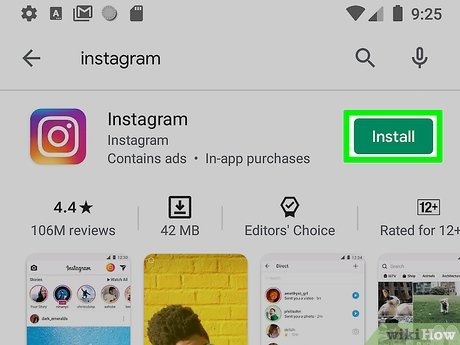
1. Download Instagram
First, install the official Instagram app on your smartphone.
On Android, open the Google Play Store and search for Instagram.
On iPhone, open the App Store and search for Instagram.
You can also access Instagram through its official website:
Make sure you’re using the official application rather than an unofficial copy.
2. Open Instagram
After installing the application, open it.
You should see options to:
- Create a new account
- Log in to an existing account
If you don’t already have an account, select the option to create a new account.
3. Choose Your Sign-Up Method
Instagram may allow you to register using information such as:
- Email address
- Mobile phone number
- Other supported account options
Choose an option you can access regularly because you may need it for verification or account recovery.
4. Enter Your Information
Follow the instructions displayed by Instagram.
You may need to provide:
- Email or phone number
- Name
- Date of birth
- Password
- Username
Use accurate information where required.
Important: Age Requirements
Instagram has minimum-age requirements, and these can vary based on location and applicable rules. If you’re under the required age, don’t try to bypass Instagram’s age restrictions by entering a false date of birth.
5. Verify Your Account
Instagram may send a verification code to your email address or phone number.
Enter the code into the app when requested.
If you don’t receive the code:
- Check that your information is correct.
- Check your email’s spam or junk folder.
- Wait a little and try again.
- Request another code if Instagram provides that option.
Never give your verification code or password to another person.
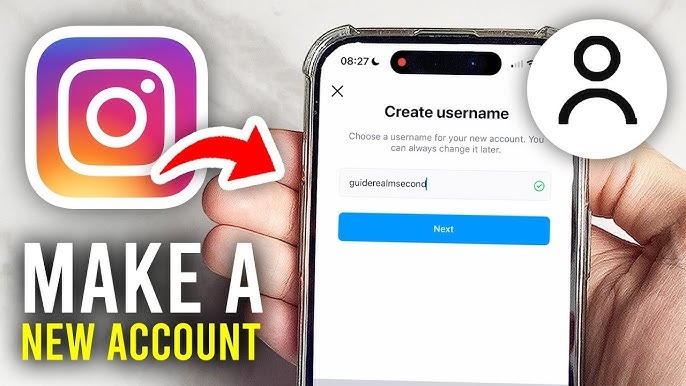
6. Choose a Username
Your username is the unique name associated with your Instagram account.
For example:
@techwithali
@futuretechnology
@saadtech
A good username should be:
- Easy to remember
- Easy to spell
- Related to your content if you have a theme
- Not misleading
- Consistent with your brand when possible
Avoid using another person’s identity or pretending to be an official organization when you aren’t.
7. Create a Strong Password
Your password protects your account.
Use a password that is difficult for other people to guess.
Avoid passwords based on:
- Your name
- Birthday
- Phone number
- Simple sequences
- Common words
Don’t reuse the same password across many important accounts.
A password manager can help you create and store unique passwords.
8. Add a Profile Picture
Your profile picture is one of the first things people see.
For a personal account, you can use an appropriate photo of yourself.
For a technology brand, you could use:
- Company logo
- Technology-themed branding
- Simple recognizable graphic
Make sure you have the right to use the image.
9. Write Your Instagram Bio
Your bio should quickly explain who you are or what your account provides.
For a technology account, you could write:
🚀 Technology & AI
💻 Software tips and tutorials
📱 Latest tech updates
🎥 New videos every week
Keep it clear and easy to understand.
10. Add a Website
If you have a legitimate website, portfolio, YouTube channel, or business page, Instagram may allow you to add a link to your profile.
Make sure the destination is trustworthy and relevant to your account.
For a software company, the link could lead to the company’s official website.
11. Choose Personal or Professional Account
Instagram provides different account types and professional features.
Depending on your goals, you may choose a professional account for activities such as:
- Content creation
- Business promotion
- Brand building
- Analytics
A personal account may be enough if you’re primarily using Instagram to communicate with friends and share personal content.
12. Set Your Privacy
Privacy settings are important.
Instagram provides settings that can control things such as:
- Who can see your posts
- Who can message you
- Who can comment
- Who can mention you
- Who can tag you
- Story visibility
If you want more privacy, review these settings carefully and use a private account where appropriate.
13. Turn on Two-Factor Authentication
Two-factor authentication, commonly called 2FA, adds another layer of security.
Even if someone obtains your password, they may still need another verification method to access your account.
Instagram supports security options that can be configured through its account settings.
This is one of the most useful steps you can take to protect your account.
14. Don’t Share Your Password
Never send your Instagram password to:
- Friends
- Strangers
- Random websites
- “Followers” offering services
- People claiming to be Instagram employees
Instagram will not need your password simply because someone says they can increase your followers.
Be particularly careful with messages promising:
“Free followers”
“Account verification”
“Guaranteed monetization”
These can be attempts to steal your account.
15. Find People to Follow
After creating your account, you can follow accounts that interest you.
For a technology account, you might follow:
- Technology news accounts
- Software companies
- Developers
- AI educators
- Gadget creators
- Educational pages
Follow accounts that provide useful or enjoyable content rather than trying to follow thousands of accounts immediately.
16. Create Your First Post
Your first post introduces your account to visitors.
For a technology account, you could post:
“Welcome to our technology page! Follow us for AI, software, gadgets, and technology tips.”
You can use an appropriate image or short video.
17. Use Instagram Reels
Reels are short-form videos and can be useful for reaching new audiences.
Technology Reel ideas include:
- “What is artificial intelligence?”
- “3 useful AI tools”
- “HTML vs CSS”
- “What is cloud computing?”
- “5 technology facts”
- “One useful smartphone feature”
Keep the video focused on one idea.
18. Write Useful Captions
A caption can provide context for your post.
For example:
“Cloud computing allows businesses to access computing resources over the internet. Here are three things beginners should understand about cloud technology.”
You can add relevant hashtags when they genuinely help categorize the content.
19. Use Hashtags Carefully
Hashtags can help categorize content, but adding a huge list of unrelated hashtags isn’t a guaranteed way to get views.
For a technology post, relevant examples might include:
#Technology
#AI
#Software
#TechTips
#ArtificialIntelligence
Choose hashtags relevant to the actual content.
20. Post Consistently
If you’re building a content account, consistency is useful.
For example, you could create a schedule such as:
- 2–3 Reels per week
- 1–2 image posts per week
- Stories when you have something useful to share
You don’t have to post every day. Choose a schedule you can realistically maintain.
21. Create Original Content
If you want to grow an Instagram account, focus on creating content that provides value.
You can:
- Explain technology
- Teach skills
- Demonstrate software
- Review products
- Share useful tips
- Discuss technology trends
Avoid copying other creators’ videos, images, or text without permission.
22. Engage With Your Audience
When people comment on your posts, respond appropriately.
You can also ask questions such as:
“Which technology topic should we explain next?”
This can encourage genuine conversation.
Don’t use spam comments or automated activity designed to manipulate engagement.
23. Check Instagram Insights
Professional accounts can have access to analytics tools.
Depending on the account and current Instagram features, you may be able to see information such as:
- Views
- Reach
- Engagement
- Follower information
- Content performance
Use this information to understand which topics your audience finds useful.
24. Protect Yourself From Scams
Be careful with messages that claim:
- Your account will be deleted
- You have won a prize
- You have been selected for verification
- Someone wants to buy your account
- You need to click a link immediately
Don’t click suspicious links or provide login information.
If a message creates urgency or asks for a password or verification code, treat it as suspicious.
25. Build a Technology Instagram Account
If your goal is to build a technology brand, use consistent branding.
For example:
Username: @FutureTechGuide
Bio:
“AI • Software • Technology
Simple tech explanations & tutorials
New content every week”
Content categories:
- AI
- Software
- Programming
- Gadgets
- Cybersecurity
- Technology news
This gives visitors a clear understanding of what they can expect.
26. Common Mistakes to Avoid
Using a Fake Identity
Don’t impersonate another person, company, or organization.
Buying Followers
Purchased followers often provide little genuine engagement and can make your account harder to evaluate accurately.
Posting Too Much Random Content
If you want to build a niche account, keep your content reasonably focused.
Sharing Private Information
Avoid publicly sharing sensitive personal information.
Ignoring Security
Always protect your account with a strong password and appropriate security settings.
Copyright Infringement
Don’t repost copyrighted videos, music, photos, or articles without the necessary rights or permission.
27. Simple Instagram Growth Strategy
If you’re creating a technology account, you can follow this process:
Step 1: Choose a technology niche.
Step 2: Create a memorable username.
Step 3: Add a professional profile picture.
Step 4: Write a clear bio.
Step 5: Secure the account with 2FA.
Step 6: Research useful content ideas.
Step 7: Create original Reels and posts.
Step 8: Publish consistently.
Step 9: Respond to genuine comments.
Step 10: Review analytics and improve your content.
1. How to Make an Instagram Account?
To learn How to Make an Instagram Account, download the official Instagram app or visit Instagram’s website, choose the sign-up option, and follow the instructions to provide the required account information.
2. Is Creating an Instagram Account Free?
Yes. Creating a basic Instagram account is free.
3. Do I Need an Email to Create an Instagram Account?
Instagram provides signup options that can include an email address or phone number, depending on the available registration method.
4. Can I Create an Instagram Account With a Phone Number?
Yes. A phone number can be used as a signup method when the option is available.
5. Can I Create an Instagram Account on a Computer?
Yes. Instagram can be accessed through a web browser, where users can sign up and manage their accounts.
6. Can I Create an Instagram Account on My Phone?
Yes. The Instagram mobile app provides account creation and management features.
7. What Information Is Needed to Create an Instagram Account?
You may need information such as an email address or phone number, a name, a username, and a password.
8. How Do I Choose an Instagram Username?
Choose a username that is easy to remember and relevant to your personal, professional, or content-creation goals.
9. Can I Change My Instagram Username Later?
Yes. Instagram allows users to change their username, although availability and other restrictions may apply.
10. What Is an Instagram Profile?
An Instagram profile is your account page where people can see information such as your username, profile picture, bio, and published content.
11. How Do I Add a Profile Picture on Instagram?
After creating your account, open your profile and use the profile-editing options to upload or change your profile picture.
12. How Do I Write an Instagram Bio?
Create a short and clear bio that explains who you are, what you do, or what type of content people can expect from your account.
13. Can I Create a Private Instagram Account?
Yes. Instagram provides privacy settings that allow users to control who can see their posts and interact with their account.
14. What Is the Difference Between a Public and Private Instagram Account?
A public account can generally be viewed by anyone, while a private account gives the owner more control over who can see their content.
15. Can I Create an Instagram Account for a Business?
Yes. Instagram provides professional account options designed for businesses and creators.
16. What Is an Instagram Professional Account?
A professional account provides additional tools and features intended for creators, businesses, and people using Instagram professionally.
17. Can I Create an Instagram Account for a Brand?
Yes. A brand can use an appropriate Instagram account to share information, content, products, and updates with its audience.
18. Can I Have More Than One Instagram Account?
Instagram supports multiple accounts, allowing users to manage different profiles for different purposes.
19. Can I Create an Instagram Account Without Posting?
Yes. You can create an account and customize your profile without immediately publishing posts.
20. How Do I Follow People on Instagram?
Search for a person, creator, business, or topic and select the Follow option on the relevant profile.
21. How Do I Upload My First Instagram Post?
After creating your account, use Instagram’s creation tools to select or capture content, edit it if desired, add a caption, and publish it.
22. What Are Instagram Stories?
Stories are temporary posts that allow users to share photos, videos, text, and other content with their audience.
23. What Are Instagram Reels?
Reels are short-form videos that can be created and shared on Instagram.
24. Can Beginners Learn How to Make an Instagram Account Easily?
Yes. The basic account-creation process is designed to be straightforward for new users.
25. How Long Does It Take to Create an Instagram Account?
The basic signup process can usually be completed quickly, although verification or additional setup may take longer.
26. Why Is My Instagram Username Unavailable?
A username may already be in use or may not meet Instagram’s requirements. Try another available username.
27. What Should I Do If I Don’t Receive a Verification Code?
Check that your email address or phone number is correct, check your messages or spam folder, and use Instagram’s available account-recovery or verification options.
28. How Can I Make My Instagram Profile Look Professional?
Use a clear profile picture, concise bio, consistent content, and relevant account information that matches your purpose.
29. Can I Add a Website Link to My Instagram Profile?
Depending on your account and Instagram’s current features, you can add links through available profile tools.
30. How Do I Protect My Instagram Account?
Use a strong, unique password, enable available security features such as two-factor authentication, and never share your password or verification codes.
31. What Is Two-Factor Authentication on Instagram?
Two-factor authentication adds an additional security step when signing in to help protect your account.
32. Can I Change My Instagram Password?
Yes. Instagram provides account settings and recovery options for changing or resetting passwords.
33. Can I Change My Instagram Email Address?
Yes. Account information can be updated through Instagram’s account settings.
34. Can I Change My Instagram Phone Number?
Yes. You can update your phone number through your account information settings when the relevant option is available.
35. Can I Delete My Instagram Account?
Yes. Instagram provides options for deleting or deactivating an account through its account-management tools.
36. What Is Instagram Used For?
Instagram is used for sharing photos, videos, Stories, Reels, messages, and other forms of visual and social content.
37. Can I Use Instagram for Business Marketing?
Yes. Businesses can use Instagram to showcase products or services, communicate with customers, and publish marketing content.
38. Can Instagram Help Grow a Personal Brand?
Yes. Consistent, useful, original content can help people build an audience and establish an online presence.
39. How Can I Get Followers on a New Instagram Account?
Focus on creating useful original content, using relevant topics, engaging respectfully with your audience, and maintaining a consistent posting strategy.
40. What Should I Post on a New Instagram Account?
Choose content related to your interests, expertise, business, or creative goals. Make sure your content follows Instagram’s rules.
41. Can I Use Instagram on Android?
Yes. Instagram is available for supported Android devices.
42. Can I Use Instagram on iPhone?
Yes. Instagram is available for supported Apple devices.
43. Can I Use Instagram Without the Mobile App?
Yes. Instagram can also be accessed through supported web browsers, although some features may differ from the mobile experience.
44. Is Instagram Safe for Beginners?
Use the official Instagram service, protect your login information, review privacy settings, and avoid sharing passwords or verification codes.
45. What Is the Best Way to Learn How to Make an Instagram Account?
Follow Instagram’s official signup process, complete the required information, customize your profile, and review privacy and security settings before using the account regularly.
Conclusion
Creating an Instagram account is relatively simple, but building a successful account requires more than registration. Start by choosing a suitable username, creating a clear profile, protecting your account, and deciding what type of content you want to publish.
If your goal is to create a technology Instagram account, focus on useful topics such as AI, software, programming, gadgets, cybersecurity, and technology tutorials. Create original content, post consistently, and use Instagram’s analytics to understand what your audience responds to.
Most importantly, protect your account. Use a strong unique password, enable two-factor authentication, avoid suspicious links, and never share your password or verification codes.
A simple formula for building your account