Cloud Computing vs Local Computing: Which Is Better in 2026?
Introduction
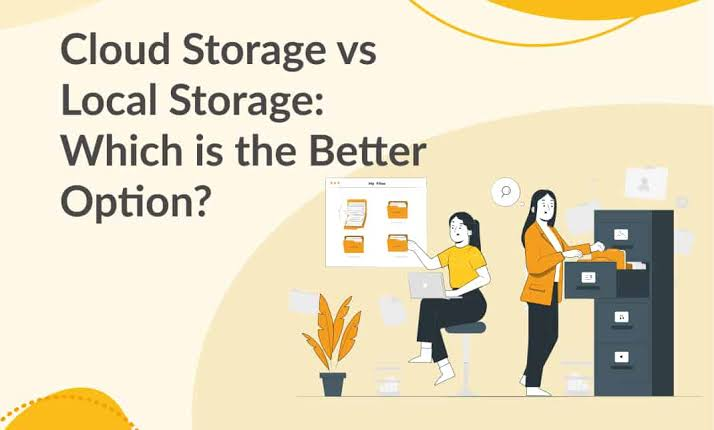
Computing has become an essential part of modern life. Businesses, schools, governments, freelancers, developers, and ordinary users depend on computers to store information, run applications, communicate, analyze data, and complete everyday tasks. As technology has evolved, two major approaches to computing have become especially important: cloud computing and local computing.
Local computing is the traditional approach. Applications and data are processed and stored on computers, servers, or other hardware controlled directly by the user or organization. Cloud computing takes a different approach by providing computing resources through remote data centers that users access over a network, usually the internet.
The difference may seem simple, but the decision between cloud and local computing can affect cost, performance, security, privacy, scalability, reliability, maintenance, and business operations.
In 2026, many organizations are no longer choosing one approach exclusively. Instead, they are combining cloud services with local systems and, increasingly, edge computing. This creates flexible environments where each workload can run where it makes the most sense.
This article provides a detailed comparison of cloud computing and local computing, explains their advantages and disadvantages, and explores how businesses can decide which approach is appropriate for their needs.
What Is Cloud Computing?
Cloud computing is the delivery of computing resources through a network. Instead of purchasing and maintaining all the physical hardware needed to run applications, users can access resources operated by a cloud provider.
Cloud providers operate large data centers containing servers, storage systems, networking equipment, security infrastructure, and specialized hardware. Customers can rent or subscribe to these resources according to their requirements.
Cloud computing includes several major service models.
Infrastructure as a Service
Infrastructure as a Service, or IaaS, provides virtual servers, storage, networking, and other infrastructure resources.
A company can create virtual machines and configure them according to its requirements without purchasing physical servers.
Platform as a Service
Platform as a Service, or PaaS, provides an environment where developers can build and deploy applications without managing all the underlying infrastructure.
This can simplify software development and allow developers to focus more on applications.
Software as a Service
Software as a Service, or SaaS, provides complete applications through the internet.
Examples include online email, collaboration platforms, project-management applications, accounting software, and customer relationship management systems.
What Is Local Computing?
Local computing refers to computing that takes place on hardware directly controlled by the user or organization.
A desktop computer running applications installed on its own storage drive is a simple example.
Businesses can also use local servers to store databases, applications, files, and other resources. These servers may be located in an office, server room, or privately operated data center.
With local computing, the organization is generally responsible for purchasing hardware, installing software, maintaining equipment, protecting systems, and managing backups.
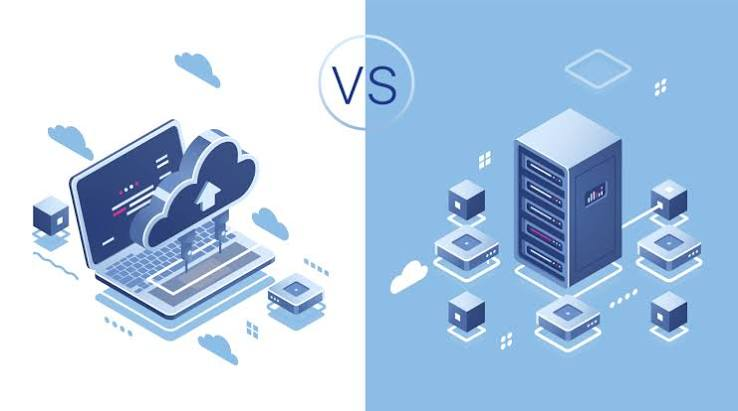
Cloud Computing vs Local Computing: The Main Difference
The most important difference is where computing resources are located and who manages the underlying infrastructure.
With cloud computing, infrastructure is generally operated by a cloud provider and accessed remotely.
With local computing, infrastructure is physically located under the user’s or organization’s direct control.
For example, a business could store its customer database on a physical server in its office. Alternatively, it could use a cloud database hosted in a remote data center.
Both approaches can work effectively, but they involve different costs, responsibilities, and technical considerations.
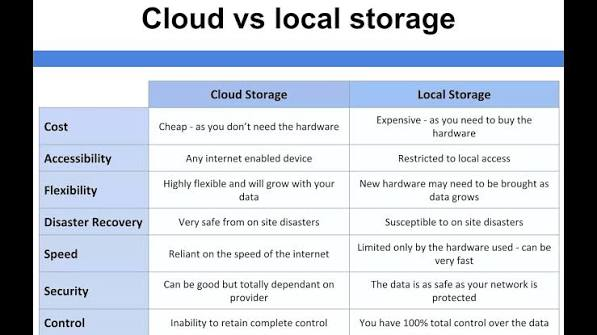
Cost Comparison
Cost is one of the first factors businesses consider when choosing between cloud and local computing.
Cloud Computing Costs
Cloud computing can reduce initial infrastructure costs because organizations do not necessarily need to purchase large numbers of physical servers.
Instead, they pay for cloud services through subscriptions or usage-based pricing.
This can be attractive to startups and small businesses that do not have large technology budgets.
However, cloud costs can become significant as usage increases. Storage, computing power, database operations, network traffic, backups, and other services may all contribute to the final bill.
Poorly managed cloud resources can create unexpected expenses.
Therefore, cloud computing is not automatically cheaper than local computing.
Local Computing Costs
Local computing usually requires greater upfront investment.
A company may need to purchase:
- Servers
- Storage systems
- Network equipment
- Computers
- Backup hardware
- Security equipment
- Software licenses
- Cooling systems
- Power infrastructure
There are also ongoing costs for maintenance, electricity, repairs, upgrades, and IT staff.
However, once hardware has been purchased, the organization may have greater control over long-term infrastructure costs.
Which Is Cheaper?
There is no universal answer.
Cloud computing may be more economical for organizations that need flexibility and do not want to purchase infrastructure.
Local computing may be more economical for workloads that require large amounts of computing continuously and can be efficiently handled by owned hardware.
Businesses should calculate the total cost of ownership rather than comparing only monthly cloud bills with hardware prices.
Performance
Performance is another important difference.
Local Performance
Local computing can provide excellent performance because data and applications may be processed directly on nearby hardware.
This can reduce network latency.
For example, a professional video editor working with large files may benefit from powerful local storage and processors because transferring enormous files repeatedly over an internet connection can be inefficient.
Local systems can also be customized with specific processors, graphics cards, memory, and storage devices.
Cloud Performance
Cloud platforms can provide access to extremely powerful computing resources.
A small company can potentially access infrastructure that would be difficult or expensive to purchase independently.
Cloud computing is particularly useful when workloads require additional resources temporarily.
For example, a company running a large data-analysis project may increase computing capacity for a few hours or days and then reduce it afterward.
Performance Winner
Local computing can be excellent for predictable workloads requiring low latency.
Cloud computing is highly attractive for workloads requiring flexibility and large-scale resources.
The best choice depends on the workload rather than simply choosing one technology.
Scalability
Scalability is one of cloud computing’s strongest advantages.
A growing company may suddenly need more storage, processing power, or application capacity.
With cloud computing, resources can often be increased quickly.
For example, an online store might experience unusually high traffic during a major sale. Cloud infrastructure can allow the company to increase resources to handle additional demand.
Local infrastructure is more difficult to scale.
If a company needs more processing power, it may have to purchase new servers, install them, configure them, and connect them to the network.
This process can take days or weeks.
Cloud computing therefore has a major advantage for businesses with unpredictable or rapidly changing workloads.
Internet Dependence
Cloud computing generally depends on network connectivity.
If an internet connection becomes unavailable, users may temporarily lose access to cloud applications and files.
This can be a major concern for businesses operating in locations with unreliable connectivity.
Local computing has an advantage here.
Applications and files stored locally can often continue working without an internet connection.
However, local systems can also depend on networks for collaboration, remote access, updates, and other services.
The ideal solution for many businesses is to design systems that can continue operating during temporary connectivity problems.
Security
Security is often one of the most misunderstood differences between cloud and local computing.
Some people assume that local computing is automatically safer because the hardware is physically inside the organization.
Others assume cloud computing is safer because major cloud providers have large security teams.
Neither assumption is always correct.
Cloud Security
Cloud providers can invest heavily in:
- Physical data-center security
- Network security
- Encryption
- Monitoring
- Access controls
- Threat detection
- Infrastructure redundancy
However, customers still have security responsibilities.
A company can create a serious security problem by using weak passwords, failing to enable MFA, incorrectly configuring cloud storage, or giving excessive permissions.
Local Security
Local computing provides direct control over hardware and infrastructure.
However, the organization must manage its own security.
It may need to protect servers against malware, unauthorized access, physical theft, network attacks, and hardware failures.
It must also keep systems updated and monitor security events.
Security Winner
Neither approach is automatically more secure.
Security depends heavily on architecture, configuration, authentication, monitoring, employee behavior, software updates, and incident-response procedures.
Data Privacy
Privacy is another important consideration.
With local computing, organizations maintain direct physical control over their infrastructure.
This can be useful for businesses with strict data-handling requirements.
Cloud computing involves storing and processing information on infrastructure operated by another organization.
Businesses therefore need to understand:
- Where data is stored
- Who can access it
- How it is encrypted
- How backups are handled
- What privacy policies apply
- What contractual protections exist
- What regulations affect the data
Organizations handling sensitive information should evaluate cloud providers carefully before moving workloads to the cloud.
Maintenance
Maintenance is a major difference between the two models.
Cloud providers handle much of the underlying infrastructure maintenance.
They manage physical servers, data centers, networking hardware, power systems, and many infrastructure-level tasks.
This reduces the workload for customers.
With local computing, the organization is responsible for maintaining its own infrastructure.
This may involve:
- Hardware replacement
- Software updates
- Security patches
- Backup systems
- Network maintenance
- Hardware monitoring
- Power management
- Disaster recovery
For small businesses with limited IT staff, cloud services can significantly reduce infrastructure-management responsibilities.
Reliability
Cloud providers generally design their infrastructure with redundancy.
They may operate multiple servers, storage systems, network connections, and data centers.
This can provide high availability.
However, cloud services can still experience outages.
Local computing can also be reliable, but a single physical server or office can represent a major point of failure.
For example, a hardware failure, fire, flood, power outage, or other physical incident could disrupt local operations.
Businesses should therefore use redundancy and backups regardless of whether they choose cloud or local computing.
Backup and Disaster Recovery
Backup is essential in both environments.
Cloud services may provide built-in backup capabilities, but organizations should not assume that cloud storage automatically equals backup.
A deleted file or compromised account can sometimes affect cloud data depending on how the service is configured.
Local computing requires businesses to build their own backup strategy.
A strong backup plan should include multiple copies of important information and, where appropriate, copies stored separately from the primary environment.
Businesses should also regularly test restoration procedures.
A backup that cannot be restored when needed is not a reliable backup strategy.
Remote Work
Remote work has increased the importance of cloud computing.
Cloud applications allow employees to access business systems from different locations.
Employees can collaborate on documents, communicate with teams, access project-management systems, and use business applications without being physically present in the office.
Local systems can also support remote work, but organizations may need additional technologies such as VPNs, remote-access systems, identity management, and stronger network security.
Cloud computing can therefore simplify remote collaboration, although it still requires strong security controls.
Collaboration
Cloud computing is particularly useful for collaboration.
Multiple employees can work with shared documents, project-management tools, communication platforms, and other applications.
Changes can often be synchronized between users.
Local computing traditionally requires files and applications to be transferred through local networks or other methods.
Modern local systems can support collaboration, but cloud-based services often make distributed teamwork easier.
Customization
Local computing generally provides greater hardware customization.
Organizations can choose specific processors, graphics cards, storage devices, memory configurations, operating systems, and specialized equipment.
Cloud services provide many configuration options, but users are working within the capabilities and policies of the provider.
For highly specialized workloads, local infrastructure may therefore be more appropriate.
Cloud Computing for Artificial Intelligence
Artificial intelligence has increased demand for powerful computing infrastructure.
Training and running advanced AI models can require significant processing power and specialized hardware.
Cloud computing allows businesses and developers to access GPUs and other specialized resources without purchasing expensive hardware.
This can make experimentation easier.
However, companies with large and predictable AI workloads may eventually consider dedicated local or private infrastructure if the economics make sense.
Local Computing for AI
Local AI computing has also become more attractive as powerful processors and GPUs become available in personal computers and workstations.
Local AI processing can provide benefits such as reduced latency and greater control over data.
This can be particularly useful when sensitive information should not be sent to external services.
However, local AI hardware can be expensive and may not provide the scale available from major cloud platforms.
Hybrid Computing
Many organizations are choosing a third option: hybrid computing.
Hybrid computing combines local infrastructure with cloud services.
For example, a company might keep its most sensitive database on local servers while using cloud applications for communication and collaboration.
Another company might use local computers for data processing while sending selected workloads to the cloud when additional capacity is required.
Hybrid computing can provide flexibility without forcing organizations to move everything into one environment.
Edge Computing
Edge computing takes the idea of local processing further.
Instead of sending all information to a centralized cloud data center, some processing occurs close to where data is generated.
This can be useful for:
- Smart factories
- Internet of Things devices
- Healthcare equipment
- Traffic systems
- Autonomous technologies
- Security cameras
- Real-time monitoring
Edge computing can reduce latency and reduce the amount of data that needs to travel to a central cloud environment.
Advantages of Cloud Computing
Cloud computing provides several important benefits.
1. Scalability
Resources can often be increased or decreased according to demand.
2. Lower Initial Investment
Businesses can avoid purchasing large amounts of infrastructure at the beginning.
3. Remote Accessibility
Employees can access cloud applications from different locations.
4. Reduced Hardware Maintenance
The cloud provider manages much of the physical infrastructure.
5. Rapid Deployment
New services can often be launched faster than purchasing and configuring physical hardware.
6. Access to Advanced Technology
Organizations can access powerful computing, AI, analytics, databases, and other services.
7. Flexible Costs
Businesses can often pay according to usage or subscription levels.
Disadvantages of Cloud Computing
Cloud computing also has limitations.
1. Internet Dependence
Many cloud services require reliable network connectivity.
2. Ongoing Costs
Usage-based pricing can become expensive if resources are poorly managed.
3. Vendor Lock-In
Moving applications and data between providers can sometimes be difficult.
4. Less Physical Control
Customers do not physically control the underlying infrastructure.
5. Outages
Cloud services can experience service interruptions.
6. Configuration Risks
Poorly configured cloud resources can create security vulnerabilities.
Advantages of Local Computing
Local computing offers several benefits.
1. Direct Control
Organizations control their physical infrastructure.
2. Offline Operation
Many local applications can work without an internet connection.
3. Low Latency
Data can be processed locally without traveling to remote servers.
4. Custom Hardware
Businesses can build systems specifically for their workloads.
5. Physical Data Control
Organizations can maintain direct physical control over their storage systems.
Disadvantages of Local Computing
Local computing also has challenges.
1. High Initial Costs
Hardware can require significant investment.
2. Maintenance
Organizations must maintain infrastructure themselves.
3. Limited Scalability
Adding capacity requires purchasing and installing hardware.
4. Physical Risks
Local infrastructure can be affected by power failures, hardware damage, disasters, and theft.
5. IT Requirements
Organizations may need skilled employees to manage infrastructure.
Cloud vs Local Computing for Small Businesses
Small businesses often have limited budgets and technical staff.
Cloud computing can be attractive because it reduces the need to purchase servers and hire specialists to maintain physical infrastructure.
A small company can use cloud email, cloud storage, accounting software, customer-management platforms, and collaboration tools.
However, businesses should monitor recurring costs and carefully manage user permissions.
Cloud vs Local Computing for Large Businesses
Large organizations often use both cloud and local infrastructure.
They may operate private data centers while also using public cloud services.
This allows them to place workloads according to business requirements.
Large companies can also invest in dedicated IT teams capable of managing complex hybrid environments.
Cloud vs Local Computing for Developers
Developers can benefit significantly from cloud computing.
Cloud platforms provide environments for application development, testing, databases, storage, deployment, and monitoring.
Developers can create temporary environments without purchasing physical servers.
Local development remains important because developers need computers for writing and testing applications.
As a result, many developers already use a combination of local and cloud computing.
Cloud vs Local Computing for Students
Students often benefit from cloud services because they can access documents and applications from multiple devices.
Cloud storage makes it easier to continue schoolwork from different computers.
However, local applications remain useful for programming, graphic design, video editing, gaming, and other activities that require powerful hardware.
How to Choose Between Cloud and Local Computing
Businesses should consider several questions before making a decision.
What Is the Workload?
Some applications are naturally better suited to cloud environments, while others require local processing.
How Sensitive Is the Data?
Sensitive information may require additional security, privacy, and compliance controls.
How Reliable Is the Internet?
Organizations in areas with unreliable connectivity may need local capabilities.
How Fast Is the Business Growing?
Rapidly growing companies may benefit from cloud scalability.
What Is the Budget?
Companies should compare both initial and long-term costs.
Does the Company Have IT Staff?
Organizations with limited technical resources may prefer managed cloud services.
Is Low Latency Important?
Applications requiring extremely fast local responses may benefit from local or edge computing.
The Future of Cloud and Local Computing
The future is unlikely to be completely cloud-based or completely local.
Instead, computing is moving toward a distributed model involving cloud data centers, local devices, private infrastructure, and edge computing.
Artificial intelligence, IoT, autonomous systems, remote work, and data-intensive applications are increasing the demand for flexible computing architectures.
Personal computers are also becoming more powerful, particularly with specialized AI processors. This means some AI workloads can be processed locally while larger workloads can use cloud infrastructure.
The result is likely to be a computing environment where users and organizations choose the best location for each workload.
Final Comparison
Cloud computing is generally strongest when organizations need scalability, remote accessibility, rapid deployment, and access to advanced infrastructure without purchasing physical hardware.
Local computing is generally strongest when organizations need direct control, offline operation, low latency, specialized hardware, or physical control over infrastructure.
Neither approach is universally better.
For many organizations in 2026, the most practical strategy is to combine them.
Conclusion
Cloud computing and local computing represent two different approaches to delivering technology resources.
Cloud computing provides flexibility, scalability, remote access, and access to powerful infrastructure. It can reduce the burden of maintaining physical hardware and help businesses respond quickly to changing demand.
Local computing provides direct control, low latency, offline capabilities, and the ability to customize hardware and software. It remains important for specialized applications and workloads where physical control or immediate local processing is valuable.
The most effective approach is not simply choosing cloud or local computing. Businesses should evaluate each workload individually and determine where it can operate most securely, efficiently, reliably, and economically.
In many cases, cloud computing, local computing, hybrid infrastructure, and edge computing will work together. The organizations that understand how to combine these technologies will be better positioned to manage costs, improve performance, protect information, and adapt to future technological changes.