Wi-Fi 7 vs Wi-Fi 6E: What Is the Difference and Which One Should You Choose?
Wi-Fi has become one of the most important technologies in modern homes, offices, schools, businesses, and public spaces. Almost everything connected to the internet depends on a reliable wireless network, from smartphones and laptops to smart TVs, gaming systems, security devices, and smart-home products.Wi-Fi 7 vs Wi-Fi 6E
Over the past few years, Wi-Fi 6 and Wi-Fi 6E have improved wireless networking considerably. Now, Wi-Fi 7 is becoming the next major step in wireless connectivity. It promises higher throughput, lower latency, better reliability, and improved performance when many devices are connected at the same time. Wi-Fi 7 vs Wi-Fi 6E
But does Wi-Fi 7 really make a big difference compared with Wi-Fi 6E? And should someone with a Wi-Fi 6E router upgrade immediately? Wi-Fi 7 vs Wi-Fi 6E
The answer depends on the devices you own, your internet connection, your home network, and the type of activities you perform online. Wi-Fi 7 vs Wi-Fi 6E
This guide explains the major differences between Wi-Fi 7 and Wi-Fi 6E, including speed, frequency bands, channel width, latency, reliability, Multi-Link Operation, compatibility, cost, and real-world performance. Wi-Fi 7 vs Wi-Fi 6E
What Is Wi-Fi 6E?
Wi-Fi 6E is an extension of Wi-Fi 6. The “E” essentially represents an extension into the 6 GHz spectrum. Wi-Fi 7 vs Wi-Fi 6E
Traditional Wi-Fi technologies commonly use the 2.4 GHz and 5 GHz bands. Wi-Fi 6E adds access to the 6 GHz band where regulations allow it. Wi-Fi 7 vs Wi-Fi 6E
This additional spectrum gives compatible devices access to more channels and can reduce congestion. It is particularly useful in areas where many wireless networks are operating close together. Wi-Fi 7 vs Wi-Fi 6E
Wi-Fi 6E maintains many of the important technologies introduced with Wi-Fi 6, including OFDMA, MU-MIMO, Target Wake Time, and 1024-QAM. Wi-Fi 7 vs Wi-Fi 6E
The biggest advantage of Wi-Fi 6E is therefore not simply that it is “faster Wi-Fi.” Its major advantage is additional clean spectrum that can provide wider channels and less interference for compatible devices.
What Is Wi-Fi 7?
Wi-Fi 7 is based on the IEEE 802.11be standard and represents the next major generation of Wi-Fi technology. Wi-Fi 7 vs Wi-Fi 6E
It builds on Wi-Fi 6 and Wi-Fi 6E while introducing several technologies designed to improve throughput, latency, and reliability. Wi-Fi 7 vs Wi-Fi 6E
Some of its most important features include:
- 320 MHz channels
- 4096-QAM
- Multi-Link Operation (MLO)
- Multi-RU and puncturing
- Improved use of multiple frequency bands
- Better performance in demanding network environments
Intel describes Wi-Fi 7 as an evolution of Wi-Fi 6/6E designed to increase data rates, reduce latency, and improve reliability. Its Wi-Fi 7 materials highlight 320 MHz channels, 4096-QAM, MLO, and Multi-RU/puncturing as important improvements. Wi-Fi 7 vs Wi-Fi 6E
Wi-Fi 7 vs Wi-Fi 6E: Quick Comparison
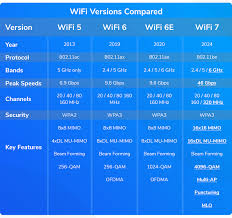
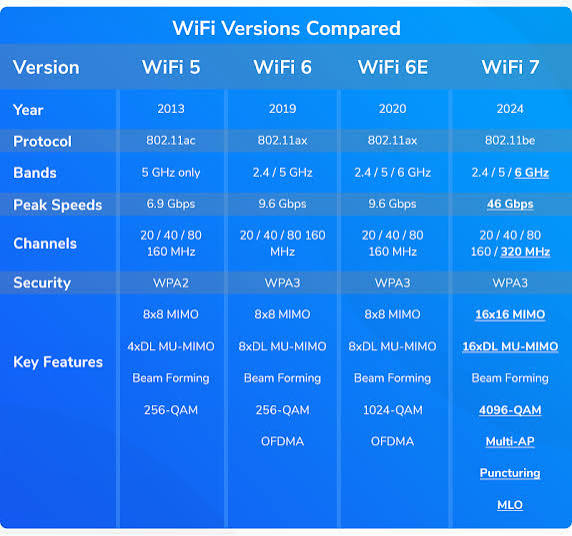
| Feature | Wi-Fi 6E | Wi-Fi 7 |
| Standard | 802.11ax | 802.11be |
| 2.4 GHz | Yes | Yes |
| 5 GHz | Yes | Yes |
| 6 GHz | Yes | Yes |
| Maximum channel width | Up to 160 MHz | Up to 320 MHz |
| Modulation | Up to 1024-QAM | Up to 4096-QAM |
| Multi-Link Operation | No | Yes |
| Multi-RU | Limited compared with Wi-Fi 7 | Yes |
| Latency | Low | Potentially lower |
| Reliability | Very good | Improved |
| Best for | Modern everyday networking | High-performance networking |
| Device cost | Generally lower | Generally higher |
The exact performance depends on the router, client device, antennas, channel conditions, regulatory environment, and network configuration.
1. Speed: Wi-Fi 7 Has the Advantage
Speed is one of the biggest reasons people are interested in Wi-Fi 7.
Wi-Fi 6E can already provide very fast wireless connections, especially through the 6 GHz band. However, Wi-Fi 7 introduces technologies that increase the potential throughput considerably.
One major improvement is support for 320 MHz channels.
Wi-Fi 6E can use channels up to 160 MHz wide. Wi-Fi 7 can support channels up to 320 MHz wide where spectrum and regulatory conditions allow. Wi-Fi 7 vs Wi-Fi 6E
A wider channel can carry more information at once. Wi-Fi 7 vs Wi-Fi 6E
Think of a wireless channel like a road. A 160 MHz channel is similar to a wide highway, while a 320 MHz channel can provide twice the channel width under suitable conditions. Wi-Fi 7 vs Wi-Fi 6E
However, wider does not automatically mean your internet connection will become twice as fast.
Your actual internet speed is also limited by your internet service plan, router capabilities, client hardware, signal conditions, and network congestion. Wi-Fi 7 vs Wi-Fi 6E
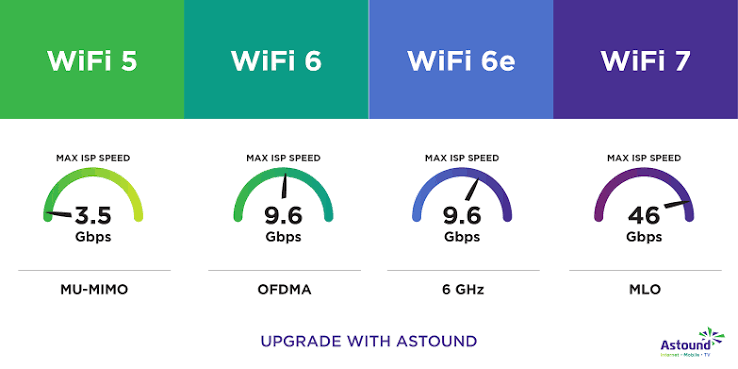
Intel states that Wi-Fi 7’s combination of 320 MHz channels and 4096-QAM can provide significantly higher peak data rates than Wi-Fi 6/6E. Wi-Fi 7 vs Wi-Fi 6E
2. 320 MHz Channels
One of the most important technical improvements in Wi-Fi 7 is 320 MHz channel support.
Wi-Fi 6E introduced the 6 GHz band, which created additional spectrum for wireless networking. But Wi-Fi 6E still generally uses channel widths up to 160 MHz. Wi-Fi 7 vs Wi-Fi 6E
Wi-Fi 7 doubles the maximum channel width to 320 MHz. Wi-Fi 7 vs Wi-Fi 6E
This can be useful for high-bandwidth activities such as:Wi-Fi 7 vs Wi-Fi 6E
- Large file transfers
- High-resolution video streaming
- Network-attached storage
- Local media streaming
- Professional workloads
- High-performance wireless networking
There is an important limitation, however.
A 320 MHz channel requires compatible hardware and suitable spectrum. If the environment does not provide enough clean spectrum, the device may use a narrower channel. Wi-Fi 7 vs Wi-Fi 6E
Therefore, buying a Wi-Fi 7 router does not guarantee that every connection will operate at 320 MHz.
3. 4096-QAM vs 1024-QAM
Another important difference is modulation.
Wi-Fi 6E can use up to 1024-QAM, while Wi-Fi 7 introduces 4096-QAM.
QAM stands for Quadrature Amplitude Modulation. Without getting too technical, it is a method used to encode more information into a wireless signal.
Higher-order modulation can transmit more data during the same transmission opportunity when signal quality is good.
Wi-Fi 7’s 4096-QAM can therefore improve peak data rates compared with Wi-Fi 6E.
But there is a catch: higher-order modulation works best when the signal is strong and conditions are favorable.Wi-Fi 7 vs Wi-Fi 6E
If your device is far away from the router or there is significant interference, you may not receive the maximum theoretical benefit.
4. Multi-Link Operation Is a Major Wi-Fi 7 Feature
Multi-Link Operation, commonly called MLO, is one of the most interesting Wi-Fi 7 technologies.
Traditional Wi-Fi connections generally use one wireless link at a time.
Wi-Fi 7 can use multiple links together under supported configurations.
For example, a compatible device and router can coordinate connections across available Wi-Fi bands.
MLO can help improve:
- Throughput
- Latency
- Connection reliability
- Network responsiveness
Instead of treating different bands as completely separate paths, Wi-Fi 7 can coordinate them through Multi-Link Operation.
This is particularly interesting for applications where consistent performance matters.
5. Latency: Wi-Fi 7 Can Be More Responsive
Speed gets most of the attention, but latency is equally important. Wi-Fi 7 vs Wi-Fi 6E
Latency is the delay between sending information and receiving a response.
A fast connection with high latency can still feel slow during interactive activities.
Wi-Fi 7 is designed to improve responsiveness through technologies such as MLO and more flexible channel utilization. Wi-Fi 7 vs Wi-Fi 6E
Lower and more predictable latency can benefit applications such as:
- Online gaming
- Video conferencing
- Remote desktop connections
- Cloud applications
- High-quality streaming
- Interactive smart-home applications
However, Wi-Fi 7 cannot eliminate latency caused by your internet service provider, distant servers, overloaded networks, or other parts of the internet. Wi-Fi 7 vs Wi-Fi 6E
6. Wi-Fi 6E Is Still Very Good
It is easy to assume that Wi-Fi 7 makes Wi-Fi 6E obsolete.
That is not true.
Wi-Fi 6E remains a strong wireless standard. Wi-Fi 7 vs Wi-Fi 6E
A good Wi-Fi 6E router can deliver excellent performance for most households.
If your main activities include:
- Web browsing
- Social media
- HD streaming
- 4K streaming
- Video calls
- Online classes
- Normal gaming
- Downloading files
then Wi-Fi 6E can already provide more than enough performance.
The advantages of Wi-Fi 7 become more interesting when you have demanding devices, very fast internet, heavy local networking, or many simultaneous users.Wi-Fi 7 vs Wi-Fi 6E
7. Frequency Bands
Both Wi-Fi 6E and Wi-Fi 7 can operate across 2.4 GHz, 5 GHz, and 6 GHz bands. Wi-Fi 7 vs Wi-Fi 6E
The difference is not that Wi-Fi 7 suddenly adds a completely new frequency band.
Instead, Wi-Fi 7 improves how the available spectrum can be used.
The 2.4 GHz band generally provides longer range but lower speeds.
The 5 GHz band offers higher performance but typically has less range than 2.4 GHz.
The 6 GHz band provides additional spectrum and can offer excellent performance at shorter distances.
Wi-Fi 7 can combine these capabilities more intelligently through features such as MLO.
8. Wi-Fi 7 and Crowded Networks
Modern homes can contain dozens of connected devices.
A typical household might have:
- Smartphones
- Tablets
- Laptops
- Smart TVs
- Streaming devices
- Game consoles
- Printers
- Smart speakers
- Cameras
- Smart appliances
- Wearables
When many devices compete for wireless resources, network efficiency becomes important.
Wi-Fi 6E already handles crowded environments much better than older Wi-Fi generations.
Wi-Fi 7 goes further with features such as Multi-RU and puncturing.
These technologies allow Wi-Fi 7 to make more flexible use of available channel resources.
Wi-Fi Alliance certification materials list Wi-Fi 7 features including Multi-RU, static puncturing, MLO-related capabilities, 320 MHz operating modes, and other enhancements.
9. Multi-RU and Puncturing
Wi-Fi 7 introduces improvements in how a large wireless channel can be used.
Imagine a wide road where one section is blocked.
Older approaches can make it difficult to use the rest of the road efficiently.
Wi-Fi 7’s puncturing capabilities can allow usable portions of a wide channel to continue carrying data rather than treating the entire channel as unusable.
This can improve spectrum efficiency in environments where interference affects only part of a wide channel.
It is another example of how Wi-Fi 7 is designed not only for higher peak speeds but also for more efficient wireless communication.
10. Real-World Speed vs Theoretical Speed
One of the biggest mistakes people make when comparing Wi-Fi generations is looking only at theoretical maximum speeds.
A router advertisement may mention multi-gigabit wireless speeds, but that does not mean your phone will automatically download files at those speeds.
Real-world performance depends on:
- Router hardware
- Client hardware
- Number of antennas
- Channel width
- Signal strength
- Interference
- Distance
- Internet connection speed
- Network congestion
- Software and drivers
- Regional spectrum regulations
For example, if your internet plan provides 500 Mbps, upgrading from Wi-Fi 6E to Wi-Fi 7 will not magically turn the internet connection into a multi-gigabit service.
You may still benefit from improved local networking and responsiveness, but your internet connection remains a major limitation.
11. Compatibility Is Extremely Important
A Wi-Fi 7 router alone does not turn every device into a Wi-Fi 7 device.
To receive Wi-Fi 7’s full benefits, the client device also needs compatible Wi-Fi 7 hardware and appropriate software support.
Older Wi-Fi devices can still connect to newer routers using supported older standards.
This means buying a Wi-Fi 7 router does not make your existing Wi-Fi 5, Wi-Fi 6, or Wi-Fi 6E devices suddenly operate as Wi-Fi 7 devices.
Intel’s documentation also emphasizes that Wi-Fi 7 hardware can maintain compatibility with earlier Wi-Fi generations, including Wi-Fi 6 and Wi-Fi 6E.
12. Wi-Fi 7 Router With Wi-Fi 6E Devices
Suppose you purchase a Wi-Fi 7 router but your laptop supports only Wi-Fi 6E.
The laptop can still connect to the router using Wi-Fi 6E capabilities.
You won’t get the complete Wi-Fi 7 feature set on that laptop.
This is important because upgrading your router is only one part of upgrading your wireless network.
If most of your devices are older, the immediate improvement may be smaller than expected.
13. Wi-Fi 6E Router With Wi-Fi 7 Devices
The opposite situation also matters.
If you have a Wi-Fi 7 laptop but your router is Wi-Fi 6E, the laptop will connect using the capabilities available from the Wi-Fi 6E network.
The Wi-Fi 7 client cannot create Wi-Fi 7 features that the router does not support.
For maximum benefit, both sides of the wireless connection need compatible capabilities.
14. Which Is Better for Gaming?
Wi-Fi 7 has an advantage for demanding wireless gaming environments because it is designed to improve throughput, latency, and reliability.
However, gamers should not assume Wi-Fi 7 automatically produces lower ping to every game server.
Internet routing and server distance can have a much bigger impact on internet latency.
For competitive gaming, wired Ethernet is still an excellent choice when available.
For wireless gaming, Wi-Fi 7 can be an attractive option, especially when both the gaming device and router support its advanced features.
15. Which Is Better for Streaming?
Both Wi-Fi 6E and Wi-Fi 7 are capable of handling modern streaming services.
A single 4K streaming device generally does not require the maximum capability of Wi-Fi 7.
However, Wi-Fi 7 becomes more useful when several high-bandwidth activities happen simultaneously.
For example, one person could be streaming high-resolution video while another transfers large files to a home server and another uses a video call.
A newer network can provide more capacity for these combined workloads.
16. Which Is Better for Smart Homes?
Smart-home networks can contain many devices.
Most simple smart-home products do not require Wi-Fi 7 speeds.
A basic smart sensor may transfer very little data.
However, smart-home networks can still benefit indirectly from better overall wireless infrastructure.
Wi-Fi 7 may become more valuable as homes add higher-bandwidth cameras, displays, appliances, entertainment devices, and other connected products.
Still, buying Wi-Fi 7 solely for a few basic smart devices is usually unnecessary.
17. Wi-Fi 7 for Offices
Businesses can benefit from Wi-Fi 7 when employees use bandwidth-intensive applications and many wireless devices share the network.
Modern offices may have:
- Laptops
- Smartphones
- Video conferencing systems
- Wireless displays
- Cloud applications
- Network storage
- IoT equipment
- Collaboration systems
In these environments, improved capacity and reliability can become more valuable than simply having a higher maximum speed.
For businesses, the decision should be based on the number of users, application requirements, existing infrastructure, and expected network growth.
18. Wi-Fi 7 for Large File Transfers
Wi-Fi 7 is especially interesting for local file transfers.
Imagine moving large video projects from a laptop to a network-attached storage system.
The internet speed does not matter much because the transfer happens inside the local network.
Here, faster wireless networking can make a noticeable difference.
This is one situation where Wi-Fi 7’s higher potential throughput can be more meaningful than it would be for ordinary web browsing.
19. Wi-Fi 6E vs Wi-Fi 7 for Home Users
For the average home user, Wi-Fi 6E remains a practical choice.
If you already have a reliable Wi-Fi 6E router and your network works well, there may be no urgent reason to replace it.
Wi-Fi 7 becomes more attractive when:
- You are buying a new router anyway.
- You have Wi-Fi 7-compatible devices.
- You have multi-gigabit internet.
- You transfer large files over Wi-Fi.
- You have a busy household network.
- You want newer wireless technology for long-term use.
20. Wi-Fi 7 vs Wi-Fi 6E Cost
Another important difference is price.
Newer networking technology generally costs more.
Wi-Fi 6E equipment has had more time to become established, so there are many products across different price ranges.
Wi-Fi 7 routers and compatible devices can cost more, particularly models with advanced hardware.
Instead of buying the most expensive router available, users should consider their actual requirements.
A powerful router is not necessarily better if your internet connection and devices cannot take advantage of it.
21. Power Consumption
Wireless performance also affects battery life.
Mobile devices need to balance speed with power efficiency.
Wi-Fi 7 includes mechanisms designed to make wireless communication more efficient, but actual battery performance depends heavily on the specific device, chipset, software, signal conditions, and workload.
Therefore, it is difficult to say that every Wi-Fi 7 phone or laptop will automatically have longer battery life than every Wi-Fi 6E device.
22. Range: Is Wi-Fi 7 Better?
Wi-Fi 7 does not simply mean dramatically greater range.
Wireless range is affected by frequency, transmit power, antennas, building materials, interference, and regulations.
The 6 GHz band used by Wi-Fi 6E and Wi-Fi 7 is excellent for high-performance short-range connectivity but generally does not travel through walls as effectively as 2.4 GHz.
Therefore, upgrading to Wi-Fi 7 does not automatically solve dead zones.
For a large house, router placement or a properly designed mesh network may matter more.
23. Mesh Networking
Wi-Fi 7 can also be used in modern mesh systems.
Mesh networks use multiple access points to provide coverage throughout a building.
Wi-Fi 7’s advanced capabilities can be useful for wireless backhaul and communication between network nodes, depending on the equipment.
However, wired Ethernet backhaul can still provide excellent performance and consistency.
Users should look beyond the Wi-Fi generation and consider the complete network architecture.
24. Security
Wi-Fi 6E and Wi-Fi 7 can support modern security technologies.
A newer Wi-Fi standard does not automatically mean that your network is completely secure.
Users should still:
- Use a strong router password.
- Keep router firmware updated.
- Use modern security settings.
- Replace outdated networking equipment.
- Avoid sharing network credentials unnecessarily.
- Keep connected devices updated.
Network security depends on configuration and maintenance as well as the wireless standard.
25. Should You Upgrade From Wi-Fi 6E to Wi-Fi 7?
If your Wi-Fi 6E network is already fast, stable, and reliable, you probably do not need to upgrade immediately.
The upgrade makes more sense when you have a specific reason.
For example, you may have recently purchased a Wi-Fi 7 laptop and want to use its full networking capabilities.
Or perhaps you have upgraded to a multi-gigabit internet connection and want a wireless network capable of taking better advantage of it.
Another reason could be heavy local networking, such as moving large files between computers and a NAS.
26. Should You Buy Wi-Fi 7 Instead of Wi-Fi 6E?
If you are building a new network today, Wi-Fi 7 is worth considering.
It is the newer generation and provides technologies that Wi-Fi 6E does not have, especially 320 MHz channels, 4096-QAM, and Multi-Link Operation.
However, price should remain part of the decision.
If a good Wi-Fi 6E router is significantly cheaper and meets your needs, it can still be an excellent purchase.
Technology does not become useless simply because a newer generation has arrived.
27. The Biggest Difference in Simple Terms
The easiest way to understand the difference is this:
Wi-Fi 6E expanded Wi-Fi 6 into the 6 GHz band.
Wi-Fi 7 builds on that foundation and adds technologies designed to use wireless spectrum more efficiently and achieve higher throughput and lower latency.
Wi-Fi 6E is about giving users more clean spectrum.
Wi-Fi 7 is about using available spectrum more intelligently while increasing performance.
28. Pros of Wi-Fi 6E
Wi-Fi 6E has several advantages:
- Excellent real-world performance
- Access to the 6 GHz band
- Lower congestion on compatible networks
- Mature hardware ecosystem
- Wide device compatibility
- Often lower equipment prices
- Strong performance for streaming and gaming
For many users, these advantages are already enough.
29. Pros of Wi-Fi 7
Wi-Fi 7 offers several important improvements:
- Up to 320 MHz channels
- 4096-QAM
- Multi-Link Operation
- Improved spectrum efficiency
- Better potential throughput
- Improved responsiveness
- Stronger capabilities for demanding networks
- Good long-term upgrade potential
These features make Wi-Fi 7 particularly interesting for high-performance home and business networks.
30. Cons of Wi-Fi 6E
Wi-Fi 6E’s main limitations are related to its position as an earlier generation.
Compared with Wi-Fi 7, it lacks some of the newer features such as:
- 320 MHz channels
- 4096-QAM
- Wi-Fi 7 MLO
- Newer Multi-RU capabilities
Nevertheless, these limitations do not mean Wi-Fi 6E performs poorly.
31. Cons of Wi-Fi 7
Wi-Fi 7 also has disadvantages.
The biggest one is cost.
You may need a new router and compatible client devices to experience its full benefits.
There can also be differences in feature support between products. Not every device necessarily implements every Wi-Fi 7 feature in exactly the same way.
Drivers, operating systems, firmware, regional regulations, and device design can also affect real-world performance.
32. The Future of Wi-Fi 7
Wi-Fi 7 is likely to become increasingly common as more smartphones, laptops, routers, tablets, and other connected devices adopt the standard.
As the ecosystem grows, the value of features such as MLO and wider channels should become more apparent.
The transition will not happen overnight.
Older Wi-Fi devices will continue to operate for years, and Wi-Fi 6E will remain useful.
The important point is that Wi-Fi generations are designed to coexist.
Final Verdict: Wi-Fi 7 vs Wi-Fi 6E
So, which is better: Wi-Fi 7 or Wi-Fi 6E?
Wi-Fi 7 is the more advanced technology.
It introduces 320 MHz channels, 4096-QAM, Multi-Link Operation, and other improvements that can provide higher throughput, lower latency, and better network efficiency.
But Wi-Fi 6E remains an excellent choice for many users.
If you already own a good Wi-Fi 6E router and your internet connection performs well, upgrading simply because Wi-Fi 7 is newer may not be necessary.
On the other hand, if you are building a new high-performance network, have compatible Wi-Fi 7 devices, use multi-gigabit internet, or frequently transfer large files over your local network, Wi-Fi 7 can be a worthwhile upgrade.
The most important lesson is that wireless performance is determined by the entire network—not just the Wi-Fi number printed on the router box.
For most ordinary users, Wi-Fi 6E is still more than capable. For users who want the latest wireless technology and need maximum performance, Wi-Fi 7 is the stronger long-term choice.